

Overview
To create a mix-and-match bundle on Shopify, define what customers can choose, add the eligible products to a bundle builder, set selection and quantity rules, choose a pricing method, and test the completed bundle before publishing. Shopify’s free Bundles app is intended for fixed bundles and multipacks, so a customer-built assortment generally needs a third-party bundle app or a custom Shopify Plus implementation. This guide uses Biscuits Bundle Builder as the worked example, but the planning and testing steps apply to any app that creates native Shopify bundles. If you are still choosing between a fixed bundle and a customer-built bundle, read the Shopify Bundles versus bundle builder guide first.
Contents
- How do mix-and-match bundles work on Shopify?
- What should you decide before creating a mix-and-match bundle?
- How do you create a mix-and-match bundle in Biscuits Bundles?
- How do you apply discounts to Shopify product bundles?
- How do mix-and-match bundles track inventory on Shopify?
- How do you test a mix-and-match bundle before publishing?
- Common questions
How do mix-and-match bundles work on Shopify?
A mix-and-match bundle lets the customer choose which products or variants make up the offer. The merchant defines the available choices and the rules; the shopper builds the final combination. Examples include “choose any six cookies,” “pick one item from each gift-box category,” and “select three to five skincare products.”
This differs from a fixed bundle. In a fixed bundle, the merchant decides which components are included and the customer may only choose options such as size or colour for those predefined components. Shopify Bundles supports fixed bundles and multipacks. A bundle builder app adds the guided storefront interface and validates customer-defined combinations.
Use a mix-and-match bundle when the offer depends on customer choice. Use a fixed bundle when every order should contain the same products. For a fuller explanation of bundle terminology, see the build-your-own bundle glossary.

What should you decide before creating a mix-and-match bundle?
Write the offer in one sentence before opening the app. For example: “Choose exactly six cookies from ten flavours for $17.” That sentence identifies the product pool, total quantity and pricing model. If the offer is hard to explain in one sentence, simplify it before building the storefront flow.
Then record these decisions:
- Products or variants: Decide whether customers choose entire products or specific variants such as size, colour or flavour.
- Steps: Group choices into a single product pool or a sequence such as box, main item, extras and gift message.
- Required choices: Mark the selections a customer must complete before adding the bundle to the cart.
- Minimums and maximums: Set per-step limits and, when needed, a total quantity limit across the bundle.
- Repeated items: Decide whether a shopper may choose the same product more than once.
- Pricing: Choose whether the total follows the selected products or uses a fixed price, percentage discount, amount discount or volume tiers.
- Unavailable items: Decide whether sold-out products should disappear or remain visible but unavailable.
Also confirm that your theme supports app blocks and identify every storefront entry point customers use. A bundle may work on its full product page while a theme’s quick-add button bypasses the required choices. Planning this now gives you a precise test list later.
How do you create a mix-and-match bundle in Biscuits Bundles?
The exact labels can change as the app evolves, but the setup sequence is straightforward. Install Biscuits Bundle Builder, open it from Shopify admin, and use the following workflow.
Step 1: Create the bundle and choose its pricing
Create a new bundle and add a clear customer-facing title. Choose the pricing method that matches the sentence you wrote during planning. Do not start with the largest available discount; start with the commercial rule the offer actually needs.
Step 2: Add steps and products
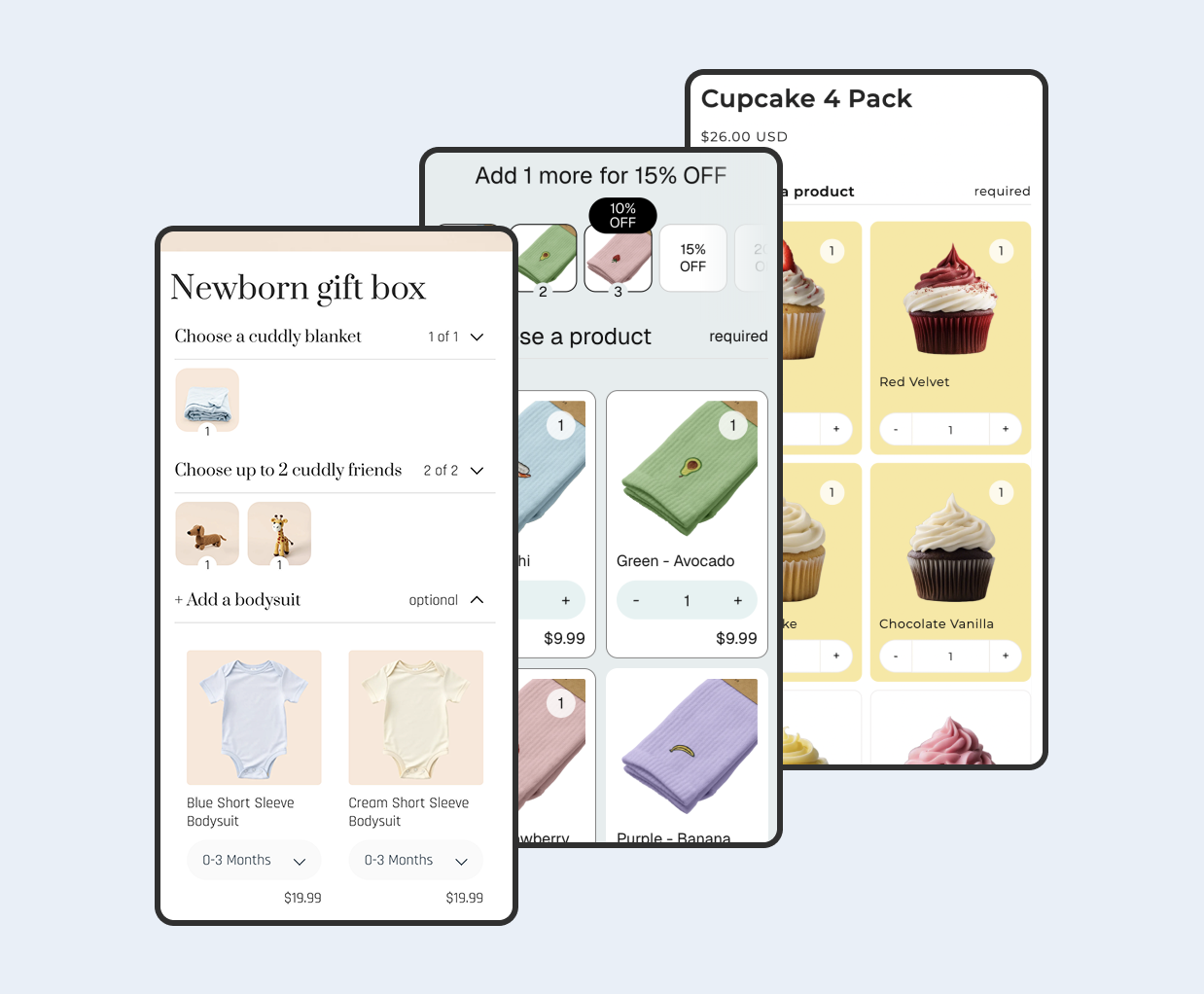
Create the first step, give it an instruction-led name such as “Choose six cookies,” and select the products or variants customers may choose. Use one step for a single product pool. Use multiple steps when the customer must make different kinds of choices, such as selecting a box, a main product and an optional add-on.
Step 3: Set selection and quantity rules
Choose single selection when the customer must pick one option, and multiple selection when several products may be combined. Apply minimum and maximum selection rules for distinct products. If customers can increase quantities, add minimum and maximum total-quantity rules so the bundle cannot be completed with too few or too many units.
For an “any six cookies” bundle, the most important rule is an exact total quantity of six. The customer may choose six different flavours or repeat favourites, but the add-to-cart action should remain unavailable until the total reaches six.
Step 4: Configure required or preselected products
Use a required product when the bundle must always contain a particular component. Use a preselected product when you want to show a sensible starting choice that the shopper can change. Keep optional extras separate from required steps so customers understand what they must choose and what they can skip.
Step 5: Choose the card and step layout
Select product-level or variant-level cards based on what the customer needs to compare. Product cards keep the page compact; variant cards expose choices such as size or flavour directly in the builder. Arrange cards in a useful order and choose a step layout that remains easy to scan on mobile.
Step 6: Save, add the product image and view the bundle
Review the bundle, save it, and add the product image and other merchandising details in Shopify. Open the storefront product page rather than assuming the admin preview represents the final theme. If you want another starting point for the offer itself, browse these build-your-own bundle ideas by niche.
How do you apply discounts to Shopify product bundles?
Apply the discount inside the bundle setup when the app’s bundle pricing is meant to control the offer. The best method depends on the promise you make to customers:
- Sum of products: The bundle total is the sum of selected item prices. Use this when customer choice is the main benefit and no discount is required.
- Fixed total price: Every valid combination costs the same amount. This is clear for offers such as “any six for $17,” but it works best when eligible products have similar values.
- Percentage discount: Reduce the selected-product subtotal by a percentage. This preserves relative prices when products vary in value.
- Amount discount: Subtract a set amount from the qualifying bundle. This is useful when the offer is communicated as a specific saving.
- Volume discount: Change the discount at quantity thresholds. Use this when buying more should unlock a larger saving.
There is no universal best bundle discount. Check margin, price variation between eligible items and whether the rule is easy to understand. Test how the bundle pricing interacts with automatic discounts, discount codes, localized prices and rounding in every important market. The storefront, cart and checkout should all show the same offer customers were promised.
How do mix-and-match bundles track inventory on Shopify?
A native Shopify bundle uses its component products and variants. Bundle availability is derived from the inventory available for those components, and an order contains the selected components so Shopify can deduct their stock. You do not maintain a second, unrelated stock count for the customer-facing bundle product.
This matters when the same item is sold individually and in several bundles. All of those selling paths draw from the component’s inventory. If a required component is unavailable, the valid bundle quantity can fall even when every other item still has stock.
Test the behavior for each location used to fulfil online orders, especially when products are stocked unevenly across locations. Also confirm what customers see when one optional product sells out and when a required choice becomes unavailable. For a deeper operational explanation, read how Shopify bundle inventory sync works.
How do you test a mix-and-match bundle before publishing?
Test the exact offer from a customer’s point of view. A useful launch checklist covers:
- The minimum, maximum and exact-quantity rules for every step.
- Required, optional and preselected items.
- Repeated quantities of the same product or variant.
- Sum, fixed, percentage, amount-off or volume pricing at each relevant threshold.
- In-stock, low-stock and sold-out components.
- Desktop and mobile layouts, including long product names and variant selectors.
- The product page, cart, checkout and completed order lines.
- Inventory deductions for every selected component.
- Localized pricing and availability in each important Shopify Market.
- Theme quick-add or quick-view behavior, if those entry points are enabled.
Place at least one complete test order. Confirm that the components shown in the order match the choices made on the product page, then verify the expected inventory deduction. If a theme shortcut lets customers add an incomplete bundle, disable that shortcut for the bundle product or route customers to the full product page.

Common questions
Which app allows mix-and-match bundles on Shopify?
Choose an app that supports the selection rules, pricing model, inventory behavior, storefront layout and sales channels your offer requires. Biscuits Bundle Builder supports step-based mix-and-match and build-a-box offers. If you want to compare several options, use the Shopify build-a-box app buyer’s guide.
Can I create a mix-and-match bundle without an app?
Shopify’s first-party Bundles app creates fixed bundles and multipacks, not a guided builder where customers choose arbitrary products from a pool. A true mix-and-match experience therefore needs a third-party app or a custom implementation. Shopify Plus stores can build custom bundle experiences with Shopify’s Bundles APIs, but that is a development project rather than a no-code setup.
Can I use mix-and-match bundles with subscriptions?
Shopify’s current bundle eligibility guidance says bundles are not compatible with purchase options, including subscriptions. Confirm the latest platform and app limitations before planning a subscription bundle, because compatibility can change.
What theme do I need for a mix-and-match bundle?
Use an Online Store 2.0 theme that supports app blocks on the product template. After adding the bundle app block, test your theme’s mobile layout, cart drawer, quick-add features and any custom product-page code.
 View on app store