

Overview
The best Shopify bundle app depends on the type of offer you want to sell. A store creating fixed kits has different requirements from one building mix-and-match gift boxes, quantity breaks or bundles that must integrate with a 3PL.
This guide matches six current options to their strongest documented use cases: Shopify Bundles, Biscuits Bundle Builder, Fast Bundle, Simple Bundles, Bundler and Kaching Bundles. It is a feature-to-requirement comparison, not a ranking based on unverified revenue claims or review scores.
Prices and capabilities can change, so use the linked Shopify App Store listings to confirm the details that matter to your store before installing an app.
Contents
- Which Shopify bundle app fits each bundle type?
- Shopify Bundles for fixed bundles and multipacks
- Biscuits Bundle Builder for mix-and-match and build-a-box offers
- Fast Bundle for several offer types in one app
- Simple Bundles for inventory and fulfillment workflows
- Bundler for budget-friendly quantity breaks and mix-and-match offers
- Kaching Bundles for quantity breaks and offer testing
- How should you choose a Shopify bundle app?
Which Shopify bundle app fits each bundle type?
| Primary requirement | Option to evaluate | Why it is shortlisted | Entry pricing |
|---|---|---|---|
| Fixed kits and multipacks | Shopify Bundles | Shopify’s own app creates predefined bundles and keeps component inventory updated. | Free |
| Guided mix-and-match or build-a-box bundles | Biscuits Bundle Builder | Step-based choices, selection rules, flexible pricing, component inventory and Markets pricing. | Free up to 25 monthly orders; Standard $18.99/month |
| Multiple bundle, upsell and cross-sell formats | Fast Bundle | Mix-and-match, fixed bundles, BOGO, Buy X Get Y, add-ons and frequently bought together. | Free for development stores; paid plans start at $19/month |
| SKU breakdown and fulfillment integrations | Simple Bundles | Single and multi-SKU bundles with documented 3PL, WMS, ERP, POS and headless support. | Free for three bundles and 50 monthly orders; Basic $14/month |
| Low-cost quantity breaks and mix-and-match | Bundler | Free quantity-break features, with mix-and-match and landing pages on the Premium plan. | Free plan; Premium $9.99/month |
| Quantity breaks with analytics and A/B testing | Kaching Bundles | Volume-discount offers, several pricing methods, analytics and built-in A/B testing. | Free for development stores; Starter $14.99/month |
Prices above are the public entry points shown on the Shopify App Store when this guide was verified. Revenue, order or plan limits can affect the actual cost, and annual billing can differ from monthly billing.
Shopify Bundles for fixed bundles and multipacks
Shopify Bundles is the simplest place to start when the merchant defines the contents. It supports fixed bundles and multipacks, lets customers choose from variants attached to the included products, and updates bundle inventory from the component products.
Choose it for a predefined skincare set, a three-pack or a kit that always contains the same products. It is not a storefront build-a-box experience where customers choose which products make up the bundle.

Best fit: straightforward fixed sets that do not need customer-built contents, advanced selection rules or a specialist bundle layout.
Biscuits Bundle Builder for mix-and-match and build-a-box offers
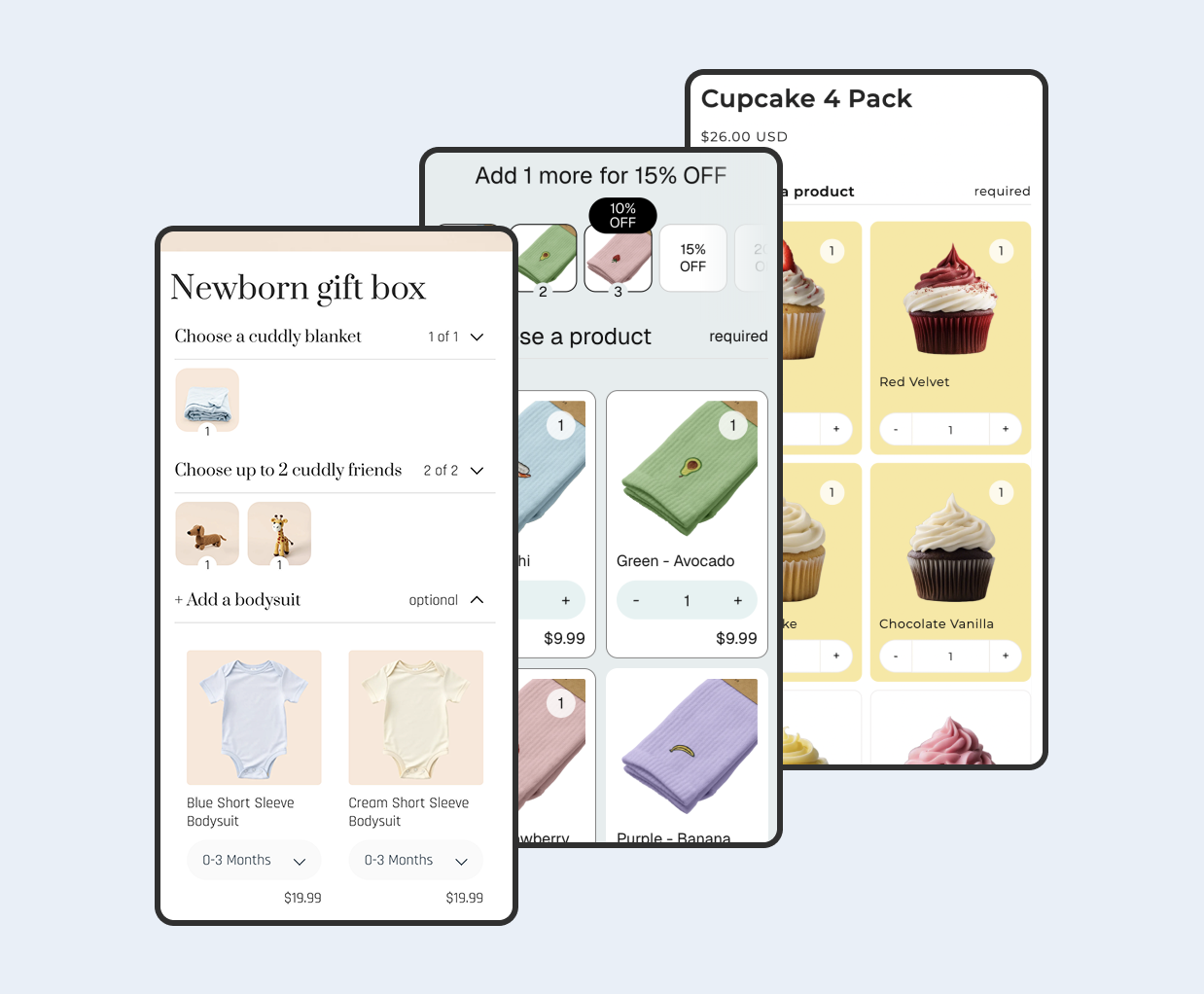
Biscuits is designed for customer-built bundles. Merchants can create collapsible steps, choose single-select or multi-select behavior, set minimum and maximum selections, control quantities and use fixed, percentage, amount-off or volume-discount pricing.
The app uses component products for inventory and documents support for Shopify Markets pricing and translations. The bundle form is placed through a Shopify theme app block, with layout and product-card controls available in the theme editor and card editor.

The free plan covers one bundle and up to 25 monthly orders. The Standard plan is $18.99 per month and adds up to 20 bundles, unlimited orders, volume discounts, required or preselected products, advanced layout settings and additional templates and translations.
Best fit: mix-and-match boxes, guided gift sets, sample packs and other offers where the customer chooses the contents within merchant-defined rules.
Fast Bundle for several offer types in one app
Fast Bundle combines product bundles and upsell formats. Its current listing includes fixed bundles, mix-and-match, build-your-own bundles, BOGO, Buy X Get Y, free gifts, add-ons, volume discounts and AI-powered frequently bought together recommendations.

This breadth can suit a merchant who wants one app for product-page bundles, promotional offers and related-product recommendations. The Standard plan starts at $19 per month and is limited by monthly bundle sales, so forecast the appropriate tier using your expected bundle revenue.
Best fit: stores that want to run several bundle, upsell and cross-sell formats from one interface.
Simple Bundles for inventory and fulfillment workflows
Simple Bundles emphasizes how bundle orders are broken down for inventory and fulfillment. Its listing covers fixed bundles, multipacks, mix-and-match, build-a-box, subscription boxes, BOGO, volume discounts and several upsell formats.
It also documents single and multi-SKU inventory sync across 3PL, WMS, ERP and fulfillment systems, plus POS and headless support on relevant plans. That makes it worth evaluating when the bundle must fit an established operations stack.

The free plan covers three bundles and 50 monthly orders. Paid plans currently start at $14 per month, with plan differences for POS locations, order-processing rules, Shopify Flow and headless support.
Best fit: merchants who put SKU breakdown, fulfillment integration and operational controls ahead of a single storefront presentation style.
Bundler for budget-friendly quantity breaks and mix-and-match offers
Bundler’s free plan includes Buy X Get Y, volume discounts, quantity breaks, flexible discount conditions, product-page upsells, Shopify POS and automatic discount application. The $9.99 Premium plan adds mix-and-match formats, quantity-break combinations, custom landing pages and funnel upsells.

Its pricing makes it an accessible option for testing discount-led bundle offers. Check the Premium and Executive feature split if you need mix-and-match layouts or bundle analytics rather than basic quantity-break promotions.
Best fit: stores that want a low-cost starting point for quantity breaks and may later add mix-and-match landing pages.
Kaching Bundles for quantity breaks and offer testing
Kaching Bundles focuses on volume-discount and bundle offers. Merchants can set eligible products or collections, choose percentage, fixed-amount or specific-price offers, customize the presentation, and review additional-revenue analytics.

Its listing also includes built-in A/B testing. Paid pricing starts at $14.99 per month for up to $1,000 of additional revenue, with higher tiers increasing that allowance.
Best fit: merchants who want quantity breaks, offer analytics and controlled testing in the same app.
How should you choose a Shopify bundle app?
What bundle is the customer actually buying?
Start with the offer, not the app list. Decide whether the contents are fixed, selected by the customer, added through quantity breaks or assembled for a fulfillment workflow. A fixed kit and a guided gift box should not be evaluated with the same checklist.
Can the app enforce the selection and pricing rules?
Write down the required steps, item limits, variant choices, repeats and discount method. Build the same small test offer in shortlisted apps and reject any option that depends on manual checking after the order is placed.
What reaches inventory, checkout and the order?
Confirm that actual component SKUs remain visible where your fulfillment team needs them and that individual sales affect bundle availability. The guide to bundle apps that automatically sync inventory explains the component-stock model in more detail.
Do you need Markets pricing, custom fields or a dedicated build-a-box experience?
Broad app comparisons cannot answer every specialist requirement. Use the focused comparisons for Shopify Markets and catalog pricing, bundle custom fields and gift messages, and Shopify build-a-box apps.
What should you test before committing?
- Required and optional selections on desktop and mobile.
- In-stock, low-stock and sold-out component behavior.
- Discount combinations and price rounding.
- Cart, checkout and order-line presentation.
- Inventory deductions and fulfillment exports.
- Markets, currencies, languages and sales channels you actually use.
- Quick add, cart drawer and theme integrations.
Use the smallest representative bundle for testing, then repeat the test with the largest realistic order. Confirm current pricing and feature limits immediately before installing because every public plan can change.
 View on app store