

Overview
On April 2, 2026, Shopify announced that native B2B features are now available on Basic, Grow, and Advanced plans at no extra cost. That means company profiles, custom catalogs, volume discounts, payment terms, and vaulted credit cards are no longer locked behind Shopify Plus. This guide walks you through setting up your first wholesale channel using these new tools, explains what stays Plus-exclusive, and shows how product bundles can lift your B2B average order value. If you are a DTC brand fielding your first wholesale inquiries, this is your starting point.
Contents
What changed on April 2, 2026?
Shopify is extending its foundational B2B features to merchants on Basic, Grow, and Advanced plans, at no extra cost. Until this announcement, these features were previously available only to merchants on the Shopify Plus plan. That meant smaller merchants had to rely on third-party apps, customer tags, and manual workarounds to sell wholesale.
For the first time, merchants on non-Plus plans can access native features including company profiles for wholesale buyers, up to three custom catalogs with tailored pricing, volume discounts and quantity rules, vaulted credit cards, and payment terms. ACH payments are also available (U.S. only on non-Plus plans).
The results from merchants already using these tools are encouraging. Across the platform, merchants who adopt Shopify B2B see up to a 33% increase in self-serve orders within six months and up to a 20% increase in reorder frequency. Merchants using Shopify B2B see up to a 4.1x increase in reorder frequency compared to DTC orders.
What is included vs. what remains Plus-exclusive
The new B2B tools cover the essentials for merchants starting out with wholesale. But Shopify has drawn a clear line between plans. Here is what you get on standard plans and what still requires Plus.
Included on Basic, Grow, and Advanced (free):
Company profiles for wholesale buyers
Up to 3 active B2B catalogs (assigned via Markets)
Volume pricing and quantity rules
Vaulted credit cards for repeat orders
Net payment terms
ACH payments (U.S. only)
Plus-exclusive features:
Unlimited catalogs for customer-specific pricing, direct catalog assignment to companies and locations, partial payments, and deposits.
The 3-catalog limit is the biggest barrier, designed to keep high-volume or complex wholesalers on the Shopify Plus plan. Because you must assign these catalogs via Shopify Markets, you cannot easily give "Company A" one price and "Company B" another price if you have more than three unique pricing tiers. For most brands just entering wholesale, however, three catalogs is more than enough to get started.
Tip - One workaround is that a merchant could use one general price list and create unique discount codes for their various customers. For example, Wholesale Customer A has a 10% off discount code, while Wholesale Customer B gets a 12% off discount code.
Step 1 - Enable B2B in your Shopify admin
Shopify B2B features are included on plans that support B2B capabilities, and most features are already turned on by default in your Shopify admin. To use Shopify B2B, you must set up your B2B customers as companies in your Shopify admin. That means there is no toggle to flip; the features are ready when you are.
Before you begin, confirm these prerequisites:
Your store is on a Basic, Grow, Advanced, or Plus plan.
You have Shopify Payments or a supported payment gateway enabled.
You are using modern customer accounts (the new account experience that supports company logins).
Shopify built B2B directly into the core of its platform, not as a bolt-on or separate product. That means if you already rely on DTC features like Shopify Flow, Markets, and Shopify Payments, they will now work for B2B too.
What if I am using classic customer accounts?
Shopify B2B requires modern (new) customer accounts. If your store still uses classic accounts, go to Settings > Customer accounts and switch to the new customer accounts experience. This enables passwordless login, company profiles, and the B2B buyer portal.
Step 2 - Create your first company profile
Company profiles are the foundation of Shopify B2B. Each wholesale buyer you work with gets a company record with locations, contacts, catalogs, and payment terms attached. This is what separates B2B from simply offering a discount code to retail customers.
From your Shopify admin, go to Customers > Companies. Click Add company. Enter a company name.
Enter a company ID. You can add an existing external ID if you are syncing B2B data in Shopify to other systems, such as ERP, or create your own unique ID.
Select a main contact. You can select an existing customer profile, or create a new customer profile.
Enter a shipping address and a billing address. Add a location ID.
In the Payment terms section, select the payment terms for the company.
Tip - Sidekick can now create B2B companies using natural language. Tell Sidekick the wholesale customer you want to create and it automatically populates all required fields including contact information, ship-to address, metafields, and payment terms. This is a huge time saver if you are onboarding multiple accounts at once.
Step 3 - Build a wholesale catalog with pricing
Catalogs control which products your B2B customers see and at what price. On standard plans, you can create up to three active catalogs and assign them through Shopify Markets.
Go to Markets in your Shopify admin and locate your B2B market (or create one).
Click Catalogs and create a new catalog.
If you want to apply a percentage increase or decrease to all of your product prices, set an overall adjustment. You can also set fixed prices and volume pricing that apply only to specific products or variants. A catalog can contain both an overall percentage and fixed prices. However, fixed prices for products or variants override any overall percentage adjustments that you set.
Add quantity rules and volume pricing to products in a catalog to set certain quantity requirements or price breaks for B2B orders.
For example, you could create an "All Wholesale" catalog with a blanket 25% discount off retail, then override specific products with fixed wholesale prices where margins differ. If your products are boxed in multiples of 10, you can set your increment rule to 10 so customers must purchase 10, 20, 30 products at a time.
Standard plans get three active pricing catalogs, assigned at the market level. For merchants with a small number of wholesale accounts on similar terms, that covers the basics. Merchants with more complex pricing will find that ceiling quickly.
What if I need more than three catalogs?
If three catalogs are not enough for your pricing structure, you have two options. First, consider the discount code workaround mentioned above to differentiate pricing within a single catalog. Second, if your wholesale operation is growing rapidly, the path between plans is seamless, no replatforming required, so upgrading to Plus when you need unlimited catalogs is straightforward.
Step 4 - Set payment terms and checkout options
Wholesale buyers expect to pay differently than retail shoppers. With native B2B, you can offer net payment terms (Net 15, Net 30, Net 60, etc.) so buyers receive an invoice and pay later, just like traditional wholesale.
Open the company profile you created in Step 2.
In the Payment terms section, select the terms you want to apply (e.g., Net 30).
In the Checkout section, optionally allow your B2B customers to ship to a new one-time address at checkout, outside their shipping address on file.
To review orders placed by B2B customers before they are approved, in the Orders submission section, select "Submit all orders as drafts for review."
Vaulted credit cards let repeat buyers check out faster by securely storing payment information. Partial payments and deposits are not available on standard plans; it is either pay now or net terms.
Side note - ACH payments are geo-locked for standard plans, only allowing U.S. vendors to pay via this method. However, Shopify currently does not restrict merchants from accepting B2B payments outside of its platform such as through check or wire transfer.
Step 5 - Boost B2B order values with product bundles
Once your wholesale channel is live, the next opportunity is increasing average order value. Product bundling is one of the most effective levers. Brands implementing product bundles see 20% sales increases and 30% profit gains according to McKinsey research. Most businesses achieve 20-30% AOV improvements with well-designed bundle strategies.
In B2B transactions, the stakes are higher, and so are the order values. By bundling complementary products together, you encourage your clients to purchase more in one go, increasing the total value of each order without additional sales effort. For example, a skincare brand could offer a "Retail Starter Kit" bundle containing bestsellers for new stockists, or a coffee roaster could bundle a sampler case with a branded display stand.
For B2B wholesalers, mixed bundling works particularly well for starter kits. Retail buyers can purchase a curated assortment to test a new product line while retaining the option to reorder individual bestsellers.
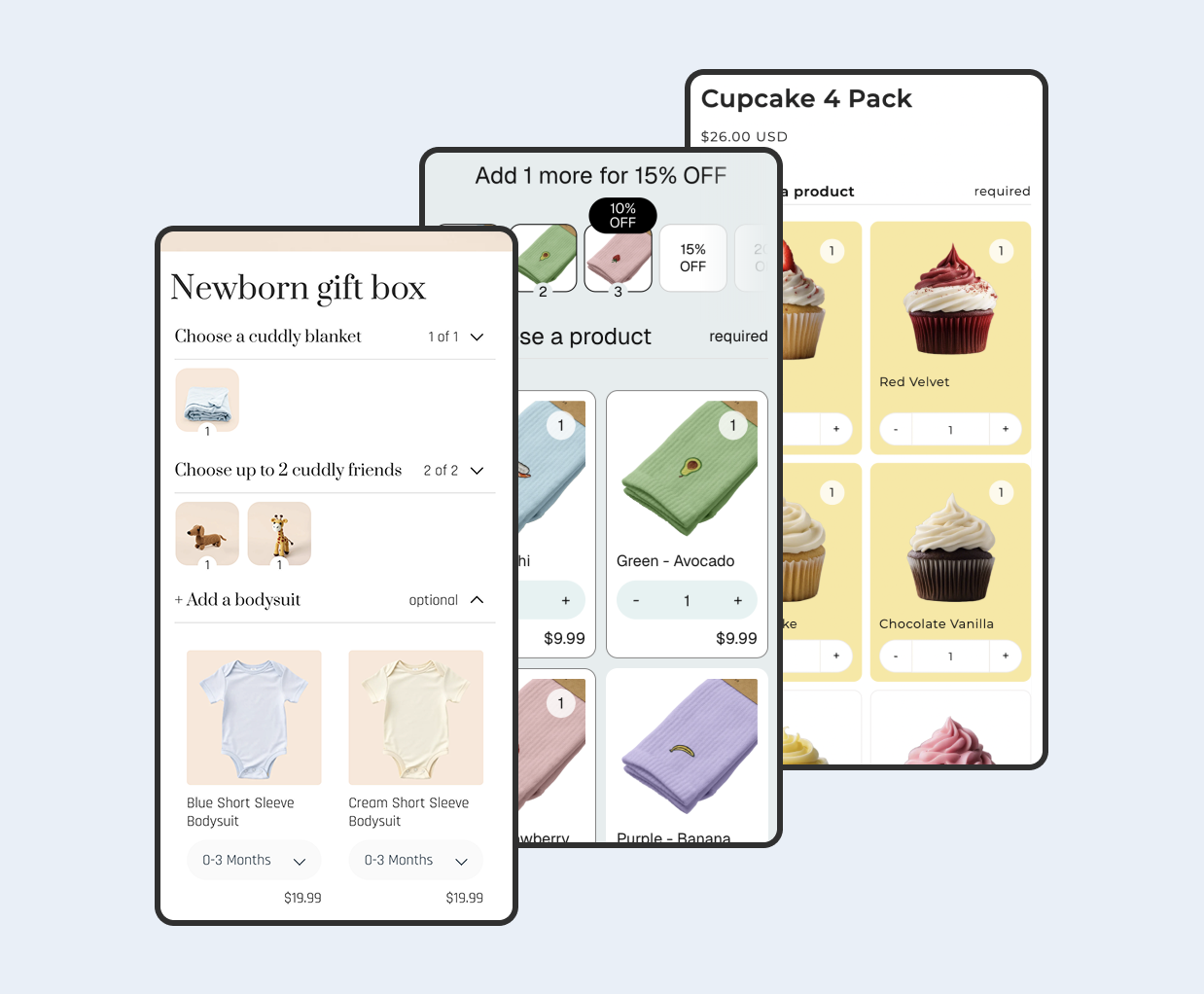
Biscuits Bundles is a Shopify bundle builder app built on the Shopify Bundles platform that works well alongside B2B catalogs. It offers a multi-step bundle builder with collapsible accordion steps, required and optional product selections, quantity selectors with total limits, and flexible pricing options including sum of products, fixed price, percentage or amount off, and volume discount tiers. Since it integrates via app blocks in Online Store 2.0 themes, your wholesale buyers can build their own custom bundles directly in your storefront. You can see working examples on the demos page.
Here are some B2B bundle strategies to consider:
Starter kit bundles: Curate an introductory assortment for new wholesale accounts to lower the barrier to a first order.
Volume discount bundles: Combine Shopify's native volume pricing with bundle builders so buyers get tiered savings when ordering larger bundles.
Build-your-own case packs: Let wholesale buyers pick their own mix of SKUs within a case using a multi-step bundle builder, increasing perceived flexibility and order size.
Seasonal assortment bundles: Create themed collections for holidays or seasonal restocks that encourage larger, planned purchases.
Tip - Combine your B2B catalog's wholesale pricing with bundle discounts carefully. Test that your margin targets hold when both discounts are applied. The visual card editor in Biscuits Bundles lets you configure product-level and variant-level cards with drag-and-drop, so you can control exactly which products appear in each bundle step.
FAQ
Do I still need Shopify Plus for B2B?
Not for the basics. Merchants on Basic, Grow, and Advanced plans can start selling wholesale using native B2B features, available in their admin. This includes up to 3 active B2B catalogs (assigned via Markets), company profiles, payment terms, volume pricing, ACH payments (U.S. only), and vaulted credit cards. These features are available to use at no additional cost. Unlimited catalogs for customer-specific pricing, direct catalog assignment to companies and locations, partial payments, and deposits remain exclusive to Plus.
How many catalogs can I create on a standard plan?
Standard plans get three active pricing catalogs, assigned at the market level. If you need unlimited catalogs with direct assignment to individual company locations, you will need Shopify Plus.
Can I run DTC and B2B from the same store?
Yes. You can use one store for both B2B and direct-to-consumer (D2C) sales, or create a separate B2B-only store. It is one unified admin, one source of truth, for every side of a business.
Do product bundles work with Shopify B2B?
Yes. Since Shopify B2B uses the same online store and product catalog, bundle apps that work via the Online Store sales channel function for B2B buyers too. Biscuits Bundles integrates through Online Store 2.0 app blocks, so wholesale customers browsing your B2B storefront can use the bundle builder just like DTC shoppers. Keep in mind that Biscuits Bundles works with the Online Store sales channel only (not POS or Shop app), which aligns with how Shopify B2B operates.
What happens when I outgrow the standard B2B features?
Plus merchants still get unlimited catalogs for customer-specific pricing, direct catalog assignment to companies and locations, partial payments, and deposits. The path between plans is seamless, no replatforming required. You will not lose any existing company profiles, catalogs, or order history when you upgrade.
What kind of results are merchants seeing with Shopify B2B?
Once Snyder Performance adopted Shopify B2B, wholesale customers could browse products and place orders autonomously, leading to a 25% reduction in time spent on back-office tasks and a 40% increase in average customer spend. These are the kinds of efficiency gains that become possible when you move from manual order processing to native self-serve tools.
 View on app store