

Overview
If you've been researching product bundles on Shopify, you've probably run into terms like BYOB, build-a-box, mix-and-match, fixed bundles, and cart transforms. They all sound similar, but each one works differently behind the scenes. This glossary defines every bundling term you're likely to encounter, explains how each concept maps to Shopify's platform, and helps you decide which approach fits your store. Whether you're evaluating apps or planning your first bundle offer, this is your single reference.
Contents
What is BYOB (Build Your Own Bundle)?
BYOB (Build Your Own Bundle) is a product bundling strategy where customers are allowed to combine multiple products of their choice within a bundle deal, typically offered with an attractive discount. Unlike fixed sets, this gives shoppers the freedom to create a personalized bundle by mixing and matching items from a curated selection. The merchant defines the rules (which product pools, how many selections, what discount), while the customer decides what goes in the box.
You may also see BYOB referred to as "build-a-box," "create your own bundle," "bundle builder" or simply "mix-and-match." These terms overlap heavily, though each has subtle distinctions covered in the glossary below.
How BYOB works in Shopify
Product bundles are used by merchants to group products together and sell them as a single unit. This critical merchandising strategy helps merchants to increase average order value, decrease marketing and distribution costs, and reduce inventory waste. Shopify offers different methods to merchandise bundles of products and includes product and cart APIs to support a wide range of bundle use cases.
If you want to create fixed or multipack bundles, you can use the free Shopify Bundles app, available for all Shopify plans. If you want to create mix-and-match bundles, you can choose from a curated collection of third-party bundle apps in the Shopify App Store. The Shopify Bundles app doesn't support mix-and-match bundles, so BYOB experiences require a third-party app.
Example: a step-by-step bundle builder
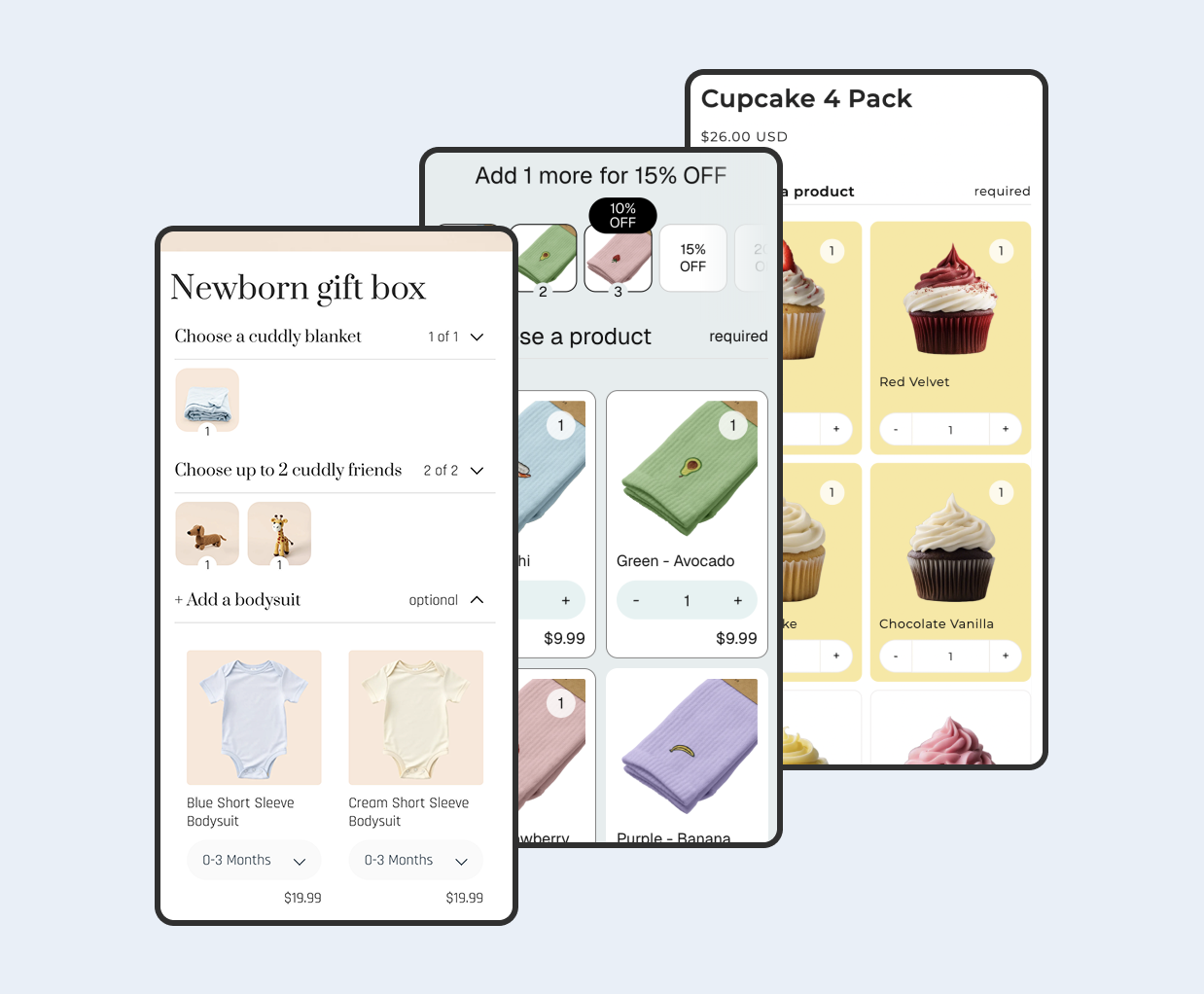
Imagine a tea shop that lets customers "Build Your Own Tea Box." Step 1: pick 3 loose-leaf teas. Step 2: choose a teapot or infuser. Step 3: optionally add honey or a mug. An app like Biscuits Bundles handles this with a multi-step bundle setup using collapsible accordion steps, required and optional steps, single or multi-select with min/max rules, and quantity selectors with total limits. Pricing can be the sum of products, a fixed price, a percentage or amount off, or volume discount tiers.

Example: a fixed bundle in the Shopify admin
Shopify Bundles is a free first-party bundles app that allows you to create and edit fixed product bundles and multipacks right from your Shopify admin, and is available on all Shopify plans. This is ideal for curated "starter kit" bundles where every customer receives the same products. No custom selection is involved.

Ready to create your own bundle? View Biscuits Bundle Builder in the Shopify App Store.
Glossary of bundle types and terms
Fixed bundle
Fixed bundles are Shopify's default implementation to support basic bundle use cases. These include standard bundles and multipack bundles that fit within Shopify's variant limits. The merchant pre-selects every product and variant; the customer simply adds the bundle to cart.
Multipack
A multipack is a special case of a fixed bundle where the customer buys multiple units of the same product, often at a volume discount. Think "3-pack of socks" or "6 bottles of hot sauce." To create a multipack bundle in the Shopify Bundles app, click the three-dot menu and select "Duplicate product."
Mix-and-match bundle
Customized bundles are used for more complex use cases, particularly when offering more choices to customers, or modelling a more complex composition of products, such as mix-and-match bundles. This is the technical name Shopify uses for what most merchants call BYOB or build-a-box. Customers select products from curated pools within rules you define.
Build-a-box
Build-a-box is a marketing term for a BYOB bundle styled as a physical box the customer fills. It's popular in food, beauty, and gift niches. The underlying mechanics are identical to a mix-and-match bundle: the customer picks items from a selection, and the app enforces quantity rules and pricing. You can see live examples on the Biscuits Bundles demos page. Compare app capabilities in our build-a-box apps buyer's guide.
Guided bundle
A guided bundle walks the customer through a sequence of steps or questions, narrowing choices at each stage. For example: "Step 1: Choose your base. Step 2: Pick your toppings. Step 3: Add a drink." This multi-step approach reduces decision fatigue compared to showing every option at once. Apps that support this pattern use collapsible accordion steps or wizard-style interfaces.
Pure bundling
Pure bundling combines multiple products into a single, inseparable package, sold as one unit with no option for individual purchase. The big difference between pure and mixed bundling is that mixed bundling allows the consumer to purchase the items separately while pure bundling does not. On Shopify, a fixed bundle where the component products are unpublished from the storefront acts as a pure bundle.
Mixed bundling
Mixed bundling is a marketing strategy where a company offers products or services together in a bundle but also allows customers to purchase the products separately. In mixed bundling, customers have the option to buy the bundle or only select products within the bundle. Most Shopify BYOB setups are a form of mixed bundling, since the individual products remain purchasable on their own.
Tiered discount / Volume discount / Quantity breaks
Tiered bundles increase Average Order Value (AOV) by offering higher value at set spending or quantity thresholds. For example: "Buy 3, save 10%. Buy 5, save 15%. Buy 8, save 20%." This pricing model incentivizes customers to add more items to unlock a better deal. Biscuits Bundles supports this natively through its volume discount tiers pricing option.
Cart transform (Cart Transform API)
To create bundles in Shopify, apps can use the Cart Transform API, which allows items to be bundled and their prices adjusted. This is the behind-the-scenes technology that powers most third-party bundle apps on Shopify. There is an alternate method (or a legacy style method), where apps use discount functions to apply discounts to line items in cart, which may achieve the same outcome, but look a little different.
Bundle parent and components
In Shopify's bundle architecture, the "parent" is the product that appears as a single line item in the cart and at checkout. The "components" are the individual products that get fulfilled from your inventory. Bundle inventory is determined by the inventory levels of each product included within a bundle. The product with the lowest inventory level determines how many bundles can be sold.
Frequently bought together
This is an algorithmic or manually curated recommendation displayed on a product page, suggesting complementary items. It differs from a true bundle because each product is added to the cart individually; no parent product is created. It's closer to a cross-sell than a bundle, though some apps blur this line by adding a discount when all suggested items are purchased together.
Why BYOB matters
Comprehensive analysis shows bundling increases AOV by 20-30%, with most businesses landing in the 25-35% improvement range. BYOB bundles specifically amplify this effect because BYOB taps into personalization and control. Shoppers feel like they're in charge, not being sold to. And when they feel that sense of ownership, they're more likely to convert.
Beyond AOV, BYOB helps you move slower-selling inventory by placing those items alongside bestsellers in the same selection pool. Customers are more willing to try something new when it's part of a discounted bundle they're already committed to building. Retention metrics confirm bundling improves retention by 20% on average, with leading brands achieving 35% improvement.
Tip: Start with a simple 3-step BYOB bundle targeting your most popular product category. Measure AOV and conversion rate for two weeks before expanding to more complex configurations.
For inspiration by niche, explore these build-your-own bundle ideas.
Related concepts
Average order value (AOV): The average dollar amount spent per order. Bundling is one of the most reliable strategies for increasing it.
Upsell and cross-sell: Suggesting higher-value or complementary products. Bundles can function as a structured upsell when a discount is attached.
Shopify Functions: The server-side customization framework that powers cart transforms, discount functions, and other checkout logic. Bundle apps rely on Shopify Functions to merge, expand, and re-price cart line items.
Online Store 2.0: Shopify's modern theme architecture using app blocks and JSON templates. Most BYOB apps, including Biscuits Bundles, require an Online Store 2.0 theme for proper integration via the theme editor.
Inventory sync: The process of deducting stock from individual component products when a bundle is sold, preventing overselling.
 View on app store